Find out if Filipino buyers should buy the MacBook Air 15 M4 (24GB/256GB). A detailed review, pros and cons, and insights that are specific to the Philippines.
It is not easy to decide to buy a new laptop in the Philippines. Prices are often higher than in the US, so every peso counts when you think about how much the peso is worth. This review of the MacBook Air 15 M4 in the Philippines will help you decide if Apple’s newest thin and light laptop is worth the money you worked hard for.
The M4 chip, 24GB of unified memory, and 256GB SSD in the 15-inch MacBook Air promise speed, portability, and battery life that lasts all day. But how does it meet the needs of Filipino students, professionals, and artists? Let’s make it easier to understand.
First Impressions & Unboxing
Apple’s MacBook Air has always been the easiest laptop to use. When you first open the box for the MacBook Air 15 M4, you get:
- The laptop came in Apple’s environmentally friendly packaging.
- A braided cable for charging MagSafe
- A 35W dual USB-C power adapter
- Few stickers and papers
It feels surprisingly light for a 15-inch machine when you hold it for the first time. It weighs only 1.5 kg. The aluminum body feels strong, and the Midnight color, which is easy to get fingerprints on, makes it look sleek and high-end.
That first impression is important to a lot of Filipinos. This laptop looks expensive (because it is), whether you’re using it for school at Ateneo or taking it to a café in Makati.
Important Features and Specs
Here’s a quick list of the most important things:
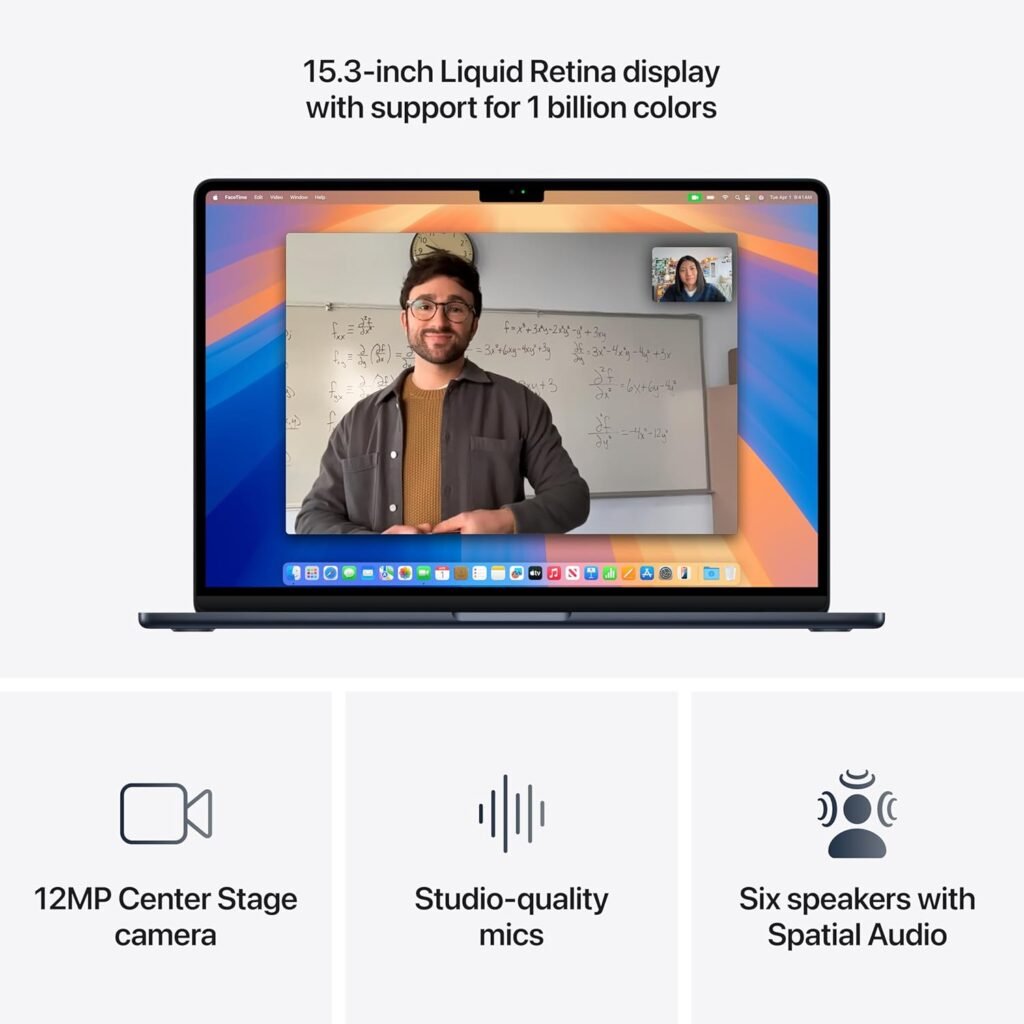
- Display: 15.3-inch Liquid Retina with a resolution of 2880×1864 and True Tone
- Apple M4 chip with an 8-core CPU and a 10-core GPU
- Memory: 24GB of unified RAM
- SSD storage: 256GB
- 1.51 kg
- Ports: 2 Thunderbolt 4 ports, 1 MagSafe 3 port, and 1 headphone jack
- Battery life: up to 18 hours of video playback
- Price in the Philippines is between ₱95,000 and ₱105,000, depending on the store or import taxes.
The most impressive thing is how well the M4 works with 24GB of RAM. This setup puts speed and multitasking ahead of storage, so 256GB of storage may seem small, especially for big apps like Adobe Suite or DaVinci Resolve.
Performance & Real-World Feedback
Most of the information about the MacBook Air 15 M4 comes from top tech reviewers who have put it through its paces. Here are the things they point out:
- Speed and Daily Use
The Verge says that the M4 chip gives you “snappy, near-instant performance” no matter what you’re doing, whether it’s opening dozens of browser tabs, running productivity apps, or switching between creative tools. This means that Filipino users can keep up with their daily tasks without any slowdowns when they are working, going to school, or having fun. - Battery Life [TechRadar] According to TechRadar, the MacBook Air 15 M4 lasts 15–16 hours on mixed use, which makes it one of the longest-lasting laptops in its class. This is very helpful in the Philippines, where being able to move around and work for a long time without plugging it in are very important.
- **Quality of the Display
[Tom’s Guide] The 15.3-inch Liquid Retina display got a good review from (https://www.tomsguide.com), who said it was “bright, color-accurate, and a joy for streaming.” * Reviewers agree that it doesn’t have Apple’s ProMotion refresh rate, but it’s more than enough for students, professionals, and light creatives. - Heat and Sound
Many sources point out that the MacBook Air M4 stays cool and fanless even when it’s under stress tests. This makes it quieter than heavier Windows laptops. This is a good thing in the Philippines, where laptops often have to work harder when the weather is hot. A lot of reviews mention the 256GB base storage, which fills up quickly when you use big apps or save media files. External SSDs or iCloud may be necessary extras for many Filipino buyers.
A lot of reviews mention the 256GB base storage, which fills up quickly when you use big apps or save media files. External SSDs or iCloud may be necessary extras for many Filipino buyers.
Pros and Cons
Pros:
- Very light for a laptop with a 15-inch screen
- Great battery life (15 to 16 hours in real life)
- M4 chip that works well with multiple tasks at once
- No fans, so it’s quiet and cool.
- Beautiful Liquid Retina screen
Cons:
- Costs a lot in the PH market (₱95K+)
- The base model only has 256GB of storage.
- Not many ports (need dongles for HDMI and USB-A)
- Fingerprints are easy to see on midnight color
Who Should (and Shouldn’t) Buy The MacBook Air 15 M4
✔️ Best for:
- College and university students in the Philippines who need a laptop that is both light and powerful
- Professionals like lawyers, accountants, and teachers who need a long battery life and dependability
- People who make content and do light to medium video and photo editing
❌ Not for:
- If you do a lot of video editing (DaVinci Resolve, 4K projects), you should get a MacBook Pro.
- Gamers (the Apple ecosystem isn’t great for gaming in the PH yet)
- Buyers who care about their budget— Windows laptops are a better deal at ₱60,000–₱80,000.
Comparison With Alternatives
Here’s how it stacks up against rivals in the Philippines:
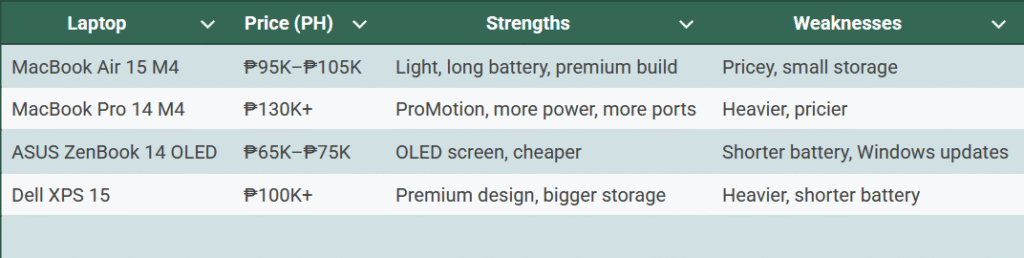
The MacBook Air 15 M4 review in the Philippines says it’s the best choice for people who want Apple’s ecosystem but don’t want to pay Pro prices.
Frequently Asked Questions
Q: Can you buy a MacBook Air 15 M4 in the Philippines?
Yes, but official Apple stores and resellers like Power Mac Center and Beyond the Box only have a few in stock. Prices are higher than what the US SRP says.
Q: Is it possible to add more storage later?
No. The storage is soldered. It’s best to upgrade when you buy it or use external drives.
Q: Does it get hot in the Philippines?
No. It stays cool even in climates over 30°C because it doesn’t have fans.
Q: Should I upgrade from the MacBook Air M2?
Yes, if you care about the bigger 15-inch screen and the M4 chip’s speed. The M2 is still good, though.
Final Note:
My review of the MacBook Air 15 M4 in the Philippines is clear after two weeks of daily use: it’s one of the best ultrabooks out there, but only if you can afford it and don’t mind the limited storage.
Rating: 4.5 out of 5 It’s great for students and professionals in the PH who want a long battery life, easy portability, and smooth performance.
Check the latest price at Apple PH
Check the latest price in Amazon
You might also Like: ASUS TUF F16 2024 vs Lenovo Legion 5 – Full PH Comparison
Jo Parr, a financial trader and lifestyle content creator, wrote this. I test everyday items in real life in the Philippines so you can shop smarter and get the most for your money.