Read on to find out why the GIGABYTE Gaming A16 review says it’s one of the best mid-range gaming laptops with an RTX 5060, Ryzen 7, and 165Hz WUXGA. Check to see if it’s right for you!
There are so many options when you want to buy a gaming laptop. The first time I turned on the GIGABYTE Gaming A16, the 165Hz WUXGA screen lit up and made me smile like a kid opening his first console.
If you’re a gamer who is sick of laggy frames and laptops that get too hot, this GIGABYTE Gaming A16 review will help you decide if it’s worth buying. This machine is great for college gamers, content creators on a budget, and even professionals who need reliable power. It can handle both play and work.
First Impressions and Opening the Box of GIGABYTE Gaming A16 review
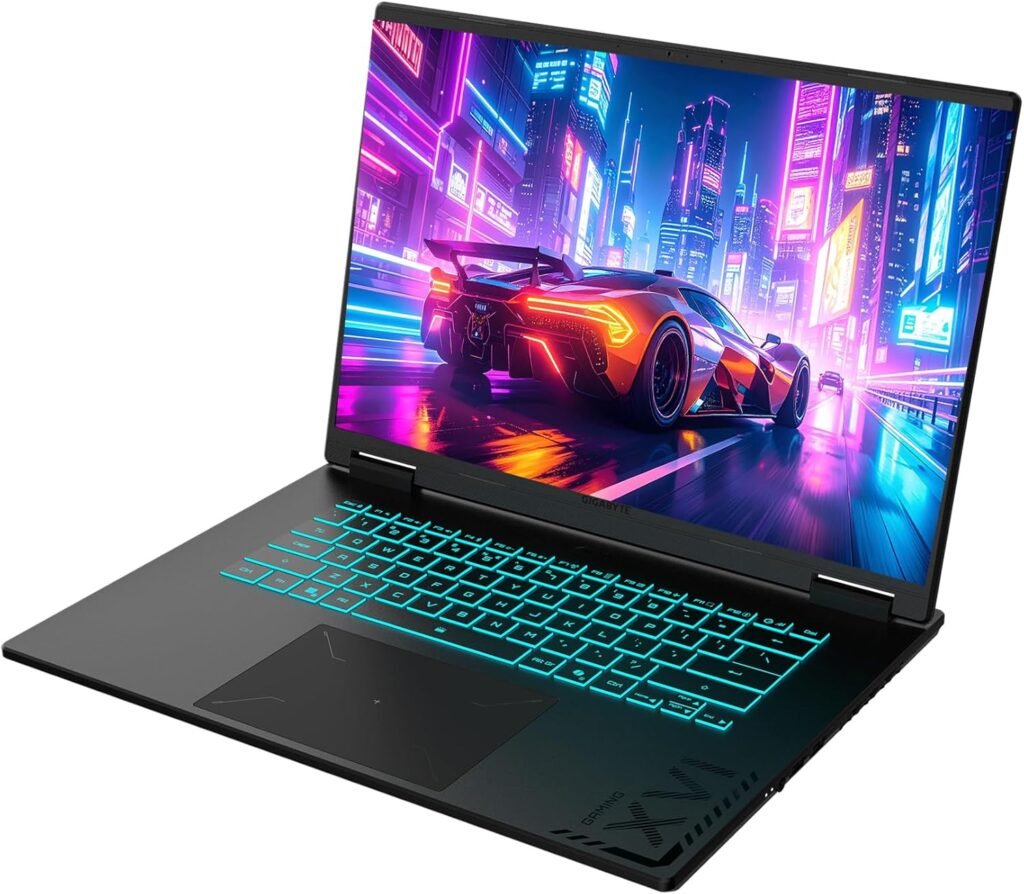
When you open the box, you see a clean black chassis with subtle branding. It’s not flashy, but it’s classy. At 2.2 kg, the laptop feels solid, and at 19.45 mm thick, it fits easily into a backpack without hurting your back.
In the box:
- The GIGABYTE Gaming A16 unit
- 240W power adapter (a little big, but that’s normal for this class)
- Guide to getting started
- Information about the warranty
What hit me? The simple look. It differs from other brands. It doesn’t shout; it whispers confidence.
Important attributes and details
This is what the GIGABYTE Gaming A16’s internal components look like:
- Display specifications: 16″ 1920×1200 WUXGA, 90% screen-to-body ratio, 165 Hz
- GPU: GeForce RTX 5060 (85W TGP) from NVIDIA
- AMD Ryzen 7 260 CPU
- 16GB of DDR5 memory (upgradable to 32GB)
- 1TB PCIe Gen4 NVMe SSD storage with an additional M.2 slot for expansion
- 76Wh battery with Type-C PD 3.0 charging
- Bluetooth 5.2 and Wi-Fi 6E connectivity
- Audio: Dual speakers with Dolby Atmos
- Keyboard: Numeric pad with Golden Curve keyboard
The GIGABYTE Gaming A16 feels generous when compared to the majority of laptops in this price range. That 165Hz WUXGA panel is ideal because it’s smoother than 144Hz and crisper than 1080p.
Tech Review Insights Backed by Experts
It’s important to see how the GIGABYTE Gaming A16 works in the hands of professional reviewers after looking at its specs, design, and value. I didn’t just go with my gut; I got information from well-known sites that test gaming laptops. The A16 has been stress-tested by websites like PC Gamer, NotebookCheck, and LaptopWorld.vn using benchmarks, gaming sessions, and thermal evaluations. Their results help us see more clearly where this laptop does well and where it doesn’t. Performance Benchmarks
- PC Gamer says that the A16’s RTX 5060 GPU (85W) makes games run smoothly at 1080p and WUXGA resolutions. The 165Hz panel also makes esports games look better. At high settings, LaptopWorld.vn measured 120–150 FPS in CS2, and the GPU temperatures stayed between 60–70°C, showing that it stayed cool under pressure. NotebookCheck gave the A16 an overall score of about 80%, praising its CPU and GPU performance but noting that its battery life is only average compared to lighter gaming laptops. Temperature and Cooling The laptop stays stable even after long periods of play because of the WINDFORCE cooling system. When the turbo fan is on, NotebookCheck found that the thermals were well-managed, but users should expect noticeable fan noise when the game is at its most intense. Ability to Upgrade The A16 has two RAM slots and two M.2 SSD slots, which means it can hold up to 4TB of data and more than 16GB of memory. This makes it a great choice for people who want to be able to upgrade their computer later. What Experts Like
- Clear 165Hz WUXGA display with high brightness and smooth refresh rates. * Good thermal performance with smart airflow design. Good performance for the price in its class. What They Don’t Like
- The battery life is average, especially when the phone is under a lot of stress. The ports are good, but they don’t have any premium extras like Thunderbolt.
- Fan noise gets louder when you play demanding games. It’s bearable, but not quiet. The Tech World Says When you look at what NotebookCheck, PC Gamer, and LaptopWorld.vn say about it, the GIGABYTE Gaming A16 comes out as a high-value performance laptop. It’s not the most portable or longest-lasting option, but if you’re a gamer who wants smooth FPS, high refresh rates, and the ability to upgrade, it’s a machine you should think about.
Pros and Cons of GIGABYTE Gaming A16
Pros: ✔️ Bright 165Hz WUXGA screen with thin bezels ✔️ Good gaming performance with the RTX 5060 ✔️ Easy to upgrade (extra M.2 slot and RAM expansion) ✔️ Dolby Atmos speakers with good clarity ✔️ Price is competitive with ASUS TUF or Acer Nitro
Cons: ❌ The battery life is only average ❌ The charger is big and heavy. Fans can get loud when they are working hard.
Who Should Buy The GIGABYTE Gaming A16
✔️ Good for:
- People who want RTX 5060 performance without paying too much
- Students who have to do schoolwork and play esports at night
- People who need Ryzen 7 and NVMe speed for editing
❌ Don’t do it if:
- You need a battery life that lasts all day without being plugged in.
- You like laptops that weigh less than 1.5 kg.
- You want RGB colors that stand out
Comparing with Other Options
The Gigabyte A16 and the ASUS TUF A16
- The A16 has a thinner body and a screen that is a little brighter.
- TUF usually has a longer battery life, but it is heavier.
Lenovo LOQ vs. Gigabyte A16
- The RTX 4060 version of LOQ is almost as good.
- A16 wins because it has a cleaner design and slots for upgrades.

Questions and Answers
Q: Is it possible to add more storage to the GIGABYTE Gaming A16?
Yes, it has two M.2 slots, so you can add an NVMe SSD.
Q: How long does the battery last?
About 5 hours for light tasks and 1.5 to 2 hours for gaming.
Q: Is the screen good for making content?
The WUXGA panel is bright and accurate enough for editing that isn’t professional.
Q: Where can I buy in the Philippines?
You can buy it online from stores like Lazada, Shopee, and Gigabyte partners in Manila.
Q: Can it work with a MUX switch?
Yes, you can switch between the iGPU and dGPU to get better performance or longer battery life.
Final Decision
The review of the GIGABYTE Gaming A16 shows that it is a laptop that strikes a good balance between performance, price, and design. This is a great deal for gamers and creators who need RTX 5060 power at a fair price. It’s not perfect—battery life and noise could be better—but it’s still a great deal.
Rating: 4.4 out of 5
👉 Look at the most recent price on Amazon
Other Links:
- Other Post: ASUS TUF F16 2024 vs Lenovo Legion 5 – Full PH Comparison
- 7 Reasons This CyberPowerPC Gamer Xtreme VR RTX 5070 Ti Review 2025 Will Change How You Game
About the Writer
This was written by Jo Parr, who is a financial trader and lifestyle content creator. I test real-world items, like laptops and tools that people use every day, to help them make better choices. My goal is to write honest reviews that talk about both the technical and the human sides of things. The Last Decision