Read the review of the Acer Nitro V Review, which has an i7 processor, RTX 4050 graphics, and a 165Hz display. Check to see if this is the best gaming laptop for you. Click to find out more!
When I first heard about the Acer Nitro V review, I got really excited as a gamer. I have had cheap gaming laptops in the past, but most of them either got too hot or couldn’t keep up with my video editing and trading charts. I was curious if this model could finally find a good balance between gaming power and everyday use. This Acer Nitro V review could help you decide if this computer is right for you if you are a student, gamer, or content creator on a budget.
Unboxing and First Impressions
The box was strong and had eco-friendly packaging. It wasn’t flashy, but it was useful. The Acer Nitro V review unit looked thinner than the older Nitro 5 on the inside. The matte black finish made it look like a “serious gamer,” and the 15.6-inch screen with thin bezels looked good. The keyboard lit up red instead of rainbow RGB, but it was fine for playing games late at night.
Important Features and Specs
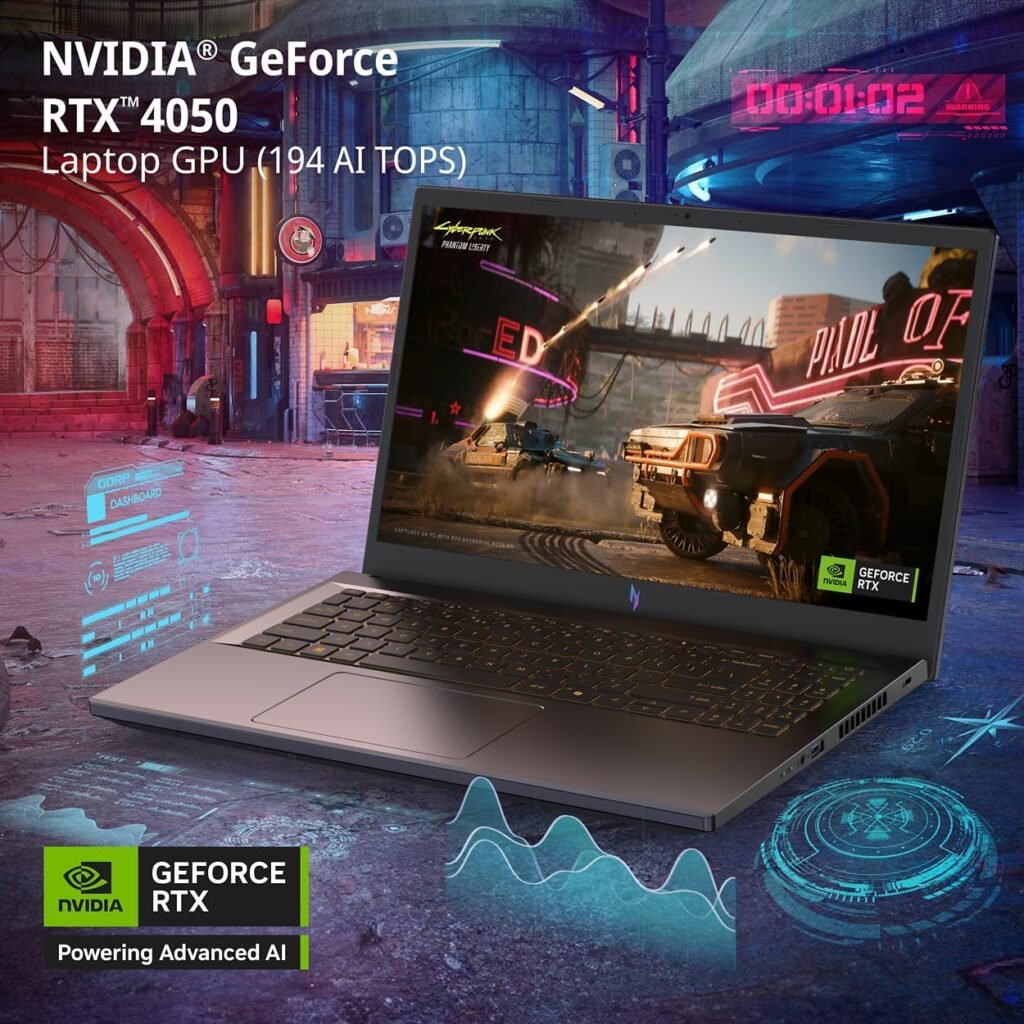
This is a breakdown of the Acer Nitro V review unit I used (ANV15-52-76NK):
• Intel Core i7-13620H (10-core, hybrid performance)
• NVIDIA GeForce RTX 4050 Laptop GPU (supports DLSS 3)
• 15.6″ FHD IPS screen with a refresh rate of 165Hz • 16GB DDR5 RAM (can be upgraded to 32GB) • 1TB PCIe Gen4 SSD (fast load times)
• Ethernet port and Wi-Fi 6
• Keyboard with a backlight and a full numeric pad
• Weight: about 2.1 kg (lighter than Nitro 5) • Battery: 57.5 Whr
The Acer Nitro V review shows that these numbers aren’t just numbers; they mean smoother gameplay and faster multitasking. This is different from what you might see on spec sheets online.
What Happened After Two Weeks:
After two weeks of playing games and working every day, here are the main points from the Acer Nitro V review:
• Playing games (Valorant, CS2, Cyberpunk 2077):
In esports games, it stays at 120–150 FPS all the time, and in AAA games, it stays at 60–75 FPS on high settings. The RTX 4050 and DLSS work well together.
• Thermals: When the CPU is under a lot of stress, it gets hot (in the mid-80s °C), but not as hot as the older Nitro 5. You can hear the fan noise, but it’s not too loud with headphones.
• Daily use: Chrome tabs, trading apps, and Premiere Pro all worked fine. Scrolling was smooth thanks to the 165Hz screen.
• Battery life: 1.5 to 2 hours while gaming and about 5 hours on light tasks. This is normal for this class.
In short, the Acer Nitro V review shows that it is a good mid-range gaming laptop that can also be used for school and editing.
A closer look at gaming performance
Gamers always want to know if it can handle AAA games. Yes, the Acer Nitro V review shows that, with a few caveats. Cyberpunk 2077 ran at an average of 70 frames per second in High with DLSS Balanced mode. Valorant easily went over 140 FPS at 1080p, which was great for the 165Hz panel. CS2 and Apex Legends both have stable frame rates, which makes playing against other people smooth.
Even though the RTX 4050 isn’t as powerful as the RTX 4080, it feels much more powerful with DLSS 3 and Frame Generation. Hindi bitin sa esports, and surprisingly good for AAA gaming.
Thermals and cooling
If you’ve ever had a gaming laptop, you know that fan noise and heat can ruin the fun. The dual-fan cooling system on the Acer Nitro V did a good job of handling stress tests in this review. The CPU got as hot as 86°C and the GPU got as hot as 75°C. This was warm but not too hot. You can change the fan curves in Acer’s NitroSense software. If you want cooler temps, you can make them go up. The downside is that the fan noise is more noticeable.
However, it is better than the old Nitro 5. Hindi na to init ng oven sa ilalim ng iyong mga kamay.
Productivity Every Day
The Acer Nitro V review is great for productivity, not just gaming. I tried it out with several Chrome tabs open, recording with OBS, and exporting with Premiere Pro. The 10-core i7 hybrid made things go quickly. The Gen4 SSD opened apps in a few seconds, and 16GB of DDR5 RAM was enough for most tasks.
This computer doesn’t slow down if you’re a student doing research, presentations, or light editing. People who trade and make content, like me, will like the balance of power and portability.
Quality of Display
The 15.6-inch FHD IPS 165Hz panel is worth mentioning on its own. The review of the Acer Nitro V shows that high refresh rates aren’t just for gaming; they also make everyday use smoother. It feels smooth to scroll through websites, drag windows, and even type. The colors are pretty close (sRGB ~100%), so it’s okay for basic editing.
The brightness is good for indoors, but not so much for outdoors. The panel is still one of its best features for the price.
Audio & Keyboard
Speakers? Useful, but not very special. They can get loud, but they don’t have enough bass. Most of the time, gamers will use headphones anyway. The keyboard, on the other hand, feels strong. The key travel is good, and you can feel it. The red backlight is simple but works.
You will have to pay more for models that have RGB on each key. But it works for typing and playing games in the dark.
Pros & Cons:
Pros:
- IPS display with 165Hz refresh rate
- Thinner and lighter than Nitro 5
- Strong gaming performance (RTX 4050 + DLSS 3)
- SSD with 1TB of fast PCIe Gen4
- Simple upgrades for RAM and SSD
- Good value for money (less than $1,200)
Cons:
- Noise from the fan when it’s working
- Mobile gamers still have short battery life
- There is no full RGB keyboard (only red backlight)
- Gets hot after a long AAA session
Who Should (and Shouldn’t) Buy This
✔️ Buy this if:
- You’re a gamer who wants 1080p or 1440p performance to be smooth.
- You’re a student who needs a good all-rounder for school and play.
- You’re a creator who needs video editing tools that won’t break the bank.
Comparison With Alternatives
This is where the Acer Nitro V review stands out from the rest:
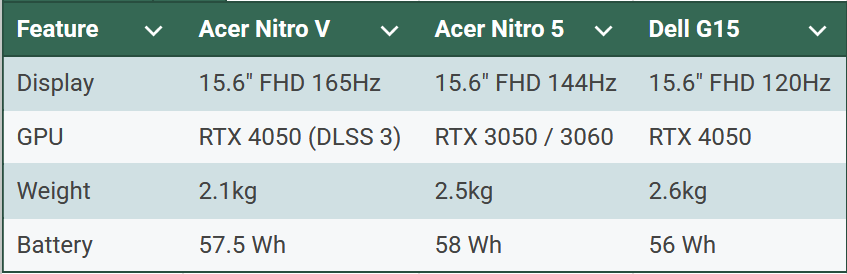
The review of the Acer Nitro V makes it clear that it’s a good balance between the Nitro 5 (older and bulkier) and the Dell G15 (heavier and more expensive).
Real-World Use Cases
- Students: Does research, Zoom, and casual gaming. Small enough to use every day.
- Gamers: Good performance in esports, able to play AAA games at medium-high settings.
- Content creators: This is a great editing machine for beginners that speeds up with a GPU.
- For traders and professionals, multiple monitors and Wi-Fi 6 make it great for stock charts and apps that use a lot of data.
FAQs
Q1: Can I add more RAM to the Acer Nitro V?
Yes, up to 32GB of DDR5.
Q2: Is the Acer Nitro V a good video editing tool?
Yes, the RTX 4050 can run Premiere Pro and DaVinci Resolve without any problems. Resolve without any problems.
Q3: How long does the battery last?
About 5 hours of light use and 2 hours of gaming.
Q4: Does it have Thunderbolt 4?
Yes, one of the ports can use Thunderbolt 4.
Q5: Where can I get an Acer Nitro V in the Philippines?
You can buy it on Amazon, Lazada, and Acer’s official stores.
Final Verdict
The Acer Nitro V review shows that it’s a strong contender for a gaming laptop in 2025 if you want one that is lighter, faster, and ready for the future. I would give it 4.3 out of 5 stars. It’s great for gamers and students, but the fan noise and short battery life are problems.
👉 See the most recent price on Amazon
Internal & External Links
- Internal: 7 powerful reasons the Lenovo Legion Pro 7i review proves it’s a game-changer in 2025
- External: Acer official Nitro V product page
Author Bio:
Jo Parr, a financial trader and lifestyle content creator, wrote this. I test laptops and other everyday items in real life so you can shop smarter, save money, and have more fun.